
How to schedule Cloudflare Workers with Cron Triggers
Cloudflare Workers can run on a schedule with Cron Triggers: you list cron expressions in your Wrangler configuration, add a scheduled() handler, and Cloudflare invokes it at the right time. No server, no container, and the same code can also answer HTTP requests.
This guide covers the configuration, the handler, local testing, the limits on Free and Paid plans, and how to trigger the same Worker over HTTP when you need more control over scheduling.
Short answer
Add [triggers] crons = ["0 * * * *"] to wrangler.toml (or "triggers": { "crons": [...] } in wrangler.jsonc), export a scheduled(controller, env, ctx) handler, and deploy. Triggers run in UTC and can take up to 15 minutes to update after a deploy. The Free plan allows 5 triggers per account with 10 ms of CPU time per run.
Add a Cron Trigger
In wrangler.toml:
name = "inventory-sync"
main = "src/index.ts"
compatibility_date = "2026-10-01"

[triggers]
crons = ["0 * * * *", "30 3 * * 1"]   # hourly, and Mondays at 03:30 UTC
Or in wrangler.jsonc:
{
  "name": "inventory-sync",
  "main": "src/index.ts",
  "compatibility_date": "2026-10-01",
  "triggers": {
    "crons": ["0 * * * *", "30 3 * * 1"]
  }
}
Expressions use the usual five fields and also accept a few extensions: 59 23 LW * *, for example, runs at 23:59 on the last weekday of each month. Check plain expressions with the cron analyzer.
Two configuration details save a lot of confusion:
- To remove triggers, set
crons = []. If you simply delete the key, the existing triggers stay in place after the next deploy. - Environments have their own triggers. Put them under
[env.staging.triggers](orenv.staging.triggersin JSON) if staging should run on a different schedule, or not at all.
Write the scheduled() handler
A Worker can export several handlers. Cron Triggers call scheduled, which receives a controller with the expression that fired:
// src/index.ts
export default {
  async scheduled(controller, env, ctx) {
    switch (controller.cron) {
      case '0 * * * *':
        await syncInventory(env);
        break;
      case '30 3 * * 1':
        await sendWeeklyReport(env);
        break;
    }
    console.log('Ran', controller.cron, 'scheduled for', new Date(controller.scheduledTime).toISOString());
  },
} satisfies ExportedHandler<Env>;
controller.cron matches the string in your configuration character for character, so copy it exactly. controller.scheduledTime is the planned time in milliseconds since the epoch (UTC), which makes a good idempotency key: if the same run is ever processed twice, "sync for 2026-10-27T09:00Z" is still one run.
The runtime waits for the handler's promise for up to 15 minutes. Work started with ctx.waitUntil() also counts, and the first promise passed to waitUntil that fails decides the status shown under the Worker's past cron events.
Test it locally
Start the dev server with scheduled testing enabled, then fire a trigger with curl:
npx wrangler dev --test-scheduled

curl "http://localhost:8787/cdn-cgi/local/scheduled?cron=0+*+*+*+*"
Spaces in the expression become +. You can add &time= with a timestamp in milliseconds to simulate a specific scheduledTime. Older tutorials mention /__scheduled; that path is no longer documented. Since October 2026, recent Wrangler versions can also fire crons from the Local Explorer at /cdn-cgi/local/explorer. Local development never runs crons on its own.
Limits on Free and Paid plans
| Workers Free | Workers Paid | |
|---|---|---|
| Cron Triggers | 5 per account | 250 per account |
| CPU time per run | 10 ms | 30 s if the interval is under 1 hour; 15 min if it is 1 hour or more |
| Wall time per run | 15 min | 15 min |
| Time zone | UTC only | |
| Applying changes | Up to 15 minutes after deploy | |
Note that the trigger limit is per account, not per Worker: on the Free plan, five Workers with one trigger each use up the allowance. CPU time only counts actual computation, so a run that mostly waits on fetch() calls uses far less than its wall time.
The dashboard keeps the 100 most recent cron events for each Worker; turn on Workers Logs for a longer history. Cron-triggered Workers run on underutilized machines, and an account-level Green Compute setting restricts them to data centers powered by renewable energy.
Trigger the same Worker over HTTP
Cron Triggers are configured at deploy time. Sometimes you want something else: more schedules than the Free plan's five, a schedule you can change without redeploying and waiting for propagation, one place to see every job across Cloudflare and other platforms, or simply a way to run the job on demand. Add a fetch handler that runs the same function, protected by a secret, and call it from an external scheduler.
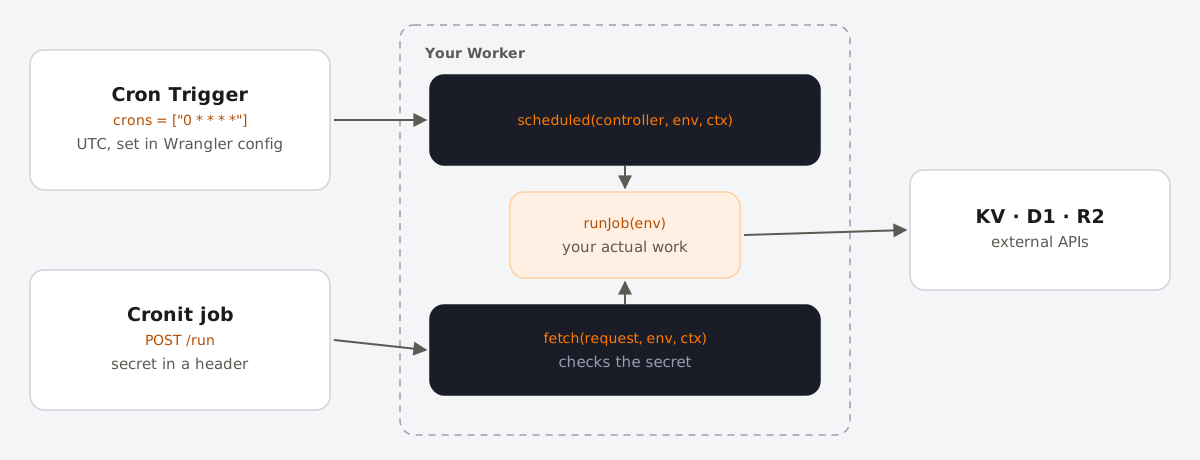
// src/index.ts
async function runJob(env: Env) {
  await syncInventory(env);
}

export default {
  async scheduled(controller, env, ctx) {
    ctx.waitUntil(runJob(env));
  },

  async fetch(request, env, ctx) {
    const url = new URL(request.url);
    if (request.method !== 'POST' || url.pathname !== '/run') {
      return new Response('Not found', { status: 404 });
    }
    if (request.headers.get('authorization') !== `Bearer ${env.CRON_SECRET}`) {
      return new Response('Unauthorized', { status: 401 });
    }
    await runJob(env);
    return Response.json({ ok: true });
  },
} satisfies ExportedHandler<Env>;
Store the secret with Wrangler rather than in the config file:
openssl rand -hex 32
npx wrangler secret put CRON_SECRET
Then create the job in Cronit: method POST, URL https://inventory-sync.YOUR-SUBDOMAIN.workers.dev/run (or your custom domain), an Authorization: Bearer … header with the secret, and the schedule you need. Because the handler awaits the job and returns an error status if it throws, each call's status in the execution logs tells you whether the run succeeded.
Two things to keep in mind. HTTP requests have their own CPU limits, separate from cron runs, and on the Free plan both are tight, so this approach does not make a heavy job cheaper. And for work that cannot finish within a single invocation, have the handler send messages to a Queue or start a Workflow instead of doing everything inline.
FAQ
- What time zone do Cloudflare Cron Triggers use?
- UTC, always. Convert local times, and remember the offset changes with daylight saving time.
- Why didn't my new cron schedule run right after deploying?
- Changes to Cron Triggers can take up to 15 minutes to reach Cloudflare's network. Check the Worker's settings to confirm the trigger is listed.
- How many Cron Triggers can I have?
- 5 per account on Workers Free and 250 per account on Workers Paid.
- Can one Worker have several schedules?
- Yes. List several expressions in
cronsand branch oncontroller.cronin the handler.