
How to run cron jobs on Vercel and Next.js
Vercel has built-in cron jobs: you declare a path and a schedule, and Vercel sends a GET request to that path on your production deployment at the right time. It works with any framework, but most people use it to call a Next.js route handler that cleans up data, sends emails or syncs an API.
This guide walks through a complete, secured setup, the plan limits that catch people out, and what to do when you need a job to run more often than the Hobby plan allows.
Short answer
Create a route that checks Authorization: Bearer $CRON_SECRET, add a crons entry to vercel.json, set the CRON_SECRET environment variable and deploy to production. On the Hobby plan a job runs at most once a day, somewhere within the hour you chose. For more frequent runs, use Pro or call the same route from an external scheduler.
Step 1: create a protected route
Your cron route is a normal public URL, so anyone who finds it can call it. Vercel solves this by sending the value of the CRON_SECRET environment variable in the Authorization header of every cron request. Check it before doing anything.
With the Next.js App Router, create app/api/cron/cleanup/route.ts:
// app/api/cron/cleanup/route.ts
export const maxDuration = 300; // seconds: up to 300 on Hobby, 800 on Pro

export async function GET(request: Request) {
  const auth = request.headers.get('authorization');
  if (!process.env.CRON_SECRET || auth !== `Bearer ${process.env.CRON_SECRET}`) {
    return new Response('Unauthorized', { status: 401 });
  }

  const deleted = await deleteExpiredSessions(); // your job
  return Response.json({ ok: true, deleted });
}
With the Pages Router, the same check goes in pages/api/cron/cleanup.ts:
import type { NextApiRequest, NextApiResponse } from 'next';

export default async function handler(req: NextApiRequest, res: NextApiResponse) {
  if (req.headers.authorization !== `Bearer ${process.env.CRON_SECRET}`) {
    return res.status(401).end('Unauthorized');
  }
  await deleteExpiredSessions();
  res.status(200).json({ ok: true });
}
Two details matter here. The !process.env.CRON_SECRET guard stops the route from accepting Bearer undefined if the variable is missing. And if you use middleware.ts for authentication, exclude /api/cron from its matcher: Vercel cron jobs do not follow redirects, so a redirect to /login means the job silently never runs.
Step 2: set CRON_SECRET
Generate a long random value (Vercel recommends at least 16 characters) and add it as an environment variable for the Production environment, either in the project settings or with the CLI:
openssl rand -hex 32
vercel env add CRON_SECRET production
Redeploy after adding it, because environment variables are read at deployment time.
Step 3: declare the schedule
Add a crons array to vercel.json at the root of the project:
{
  "crons": [
    { "path": "/api/cron/cleanup", "schedule": "0 5 * * *" }
  ]
}
If you have moved to the TypeScript configuration file introduced in December 2025, the same array goes in vercel.ts. A project can only use one configuration file.
// vercel.ts
import type { VercelConfig } from '@vercel/config/v1';

export const config: VercelConfig = {
  crons: [{ path: '/api/cron/cleanup', schedule: '0 5 * * *' }],
};
Rules for the expression:
- It is always evaluated in UTC.
0 5 * * *is 05:00 UTC, which is 06:00 or 07:00 in Paris. - Day and month names such as
MONorJANare not supported. Use numbers. - You cannot restrict both the day of the month and the day of the week in the same expression.
- The path must start with
/and point to the exact route, without relying on a redirect.
Not sure about an expression? Check it with the cron analyzer, or start from a ready-made schedule such as every day or every hour.
Step 4: deploy and test
Cron jobs only run on production deployments, never on preview deployments. After deploying, test the route yourself with the secret:
curl -i -H "Authorization: Bearer $CRON_SECRET" \
  https://your-app.vercel.app/api/cron/cleanup
You should get 200, and 401 without the header. In your function logs, real cron invocations have the user agent vercel-cron/1.0 and an x-vercel-cron-schedule header containing the expression.
Plan limits and behaviour
| Hobby | Pro | Enterprise | |
|---|---|---|---|
| Cron jobs per project | 100 | 100 | 100 |
| Most frequent schedule | Once a day | Once a minute | Once a minute |
| Timing precision | Within the hour (±59 min) | Per minute | Per minute |
| Function max duration (Fluid compute) | 300 s | 800 s | 800 s |
On Hobby, a schedule of 0 8 * * * can fire at any moment between 08:00:00 and 08:59:59, and a schedule that runs more than once a day fails the deployment with the error "Hobby accounts are limited to daily cron jobs".
On every plan, keep these behaviours in mind:
- No retries. If the function fails, Vercel does not call it again.
- Best-effort delivery. A run can be missed, and the same run can occasionally be delivered more than once.
- Overlaps are possible. If a job runs longer than its interval, the next run starts anyway.
- No redirects. A
3xxresponse, for example from a trailing-slash orwwwredirect, is not followed.
Make the job safe to run twice
Because a run can be duplicated or overlap with the previous one, design the job so that running it twice does no harm. A simple way is to record each run in your database with a unique key and skip the work if the key already exists. With Postgres:
// once per day, even if the route is called twice
const runKey = `cleanup:${new Date().toISOString().slice(0, 10)}`;

const { rowCount } = await db.query(
  'INSERT INTO cron_runs (key) VALUES ($1) ON CONFLICT DO NOTHING',
  [runKey],
);
if (rowCount === 0) {
  return Response.json({ ok: true, skipped: 'already ran today' });
}
For jobs that process a queue, prefer small batches with a LIMIT and mark each row as done in the same transaction, so a second run simply finds less work.
Run more often on Hobby with an external scheduler
Because the route is protected by a secret rather than by Vercel itself, any scheduler that can send the same header can call it. This is how you run a job every 10 minutes on the Hobby plan, get minute precision, or keep a history of every call outside Vercel.
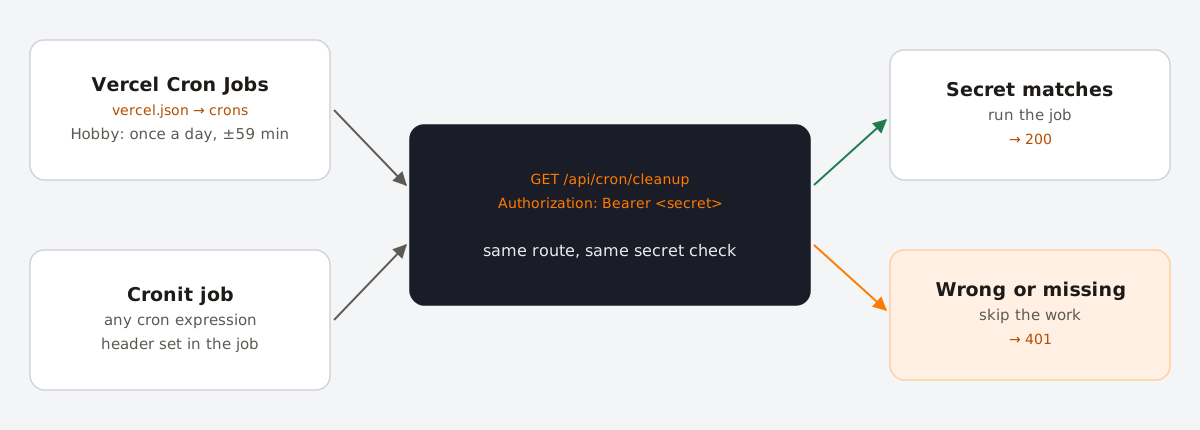
To set it up in Cronit:
- Create a new recurring job and name it after the route.
- Set the method to GET and the URL to your production address, for example
https://your-app.vercel.app/api/cron/cleanup. Use the final URL, so no redirect is involved. - In Headers, add
Authorization: Bearerfollowed by yourCRON_SECRET. - Choose the schedule, for example
*/10 * * * *for every 10 minutes. - Remove the matching entry from
vercel.jsonso the job does not also run once a day from Vercel.
Every call shows up in the job's execution logs with its status, so a 401 after a secret rotation or a 500 from a bad deploy is visible straight away. The function invocations still count toward your Vercel usage, exactly as with Vercel's own cron jobs.
FAQ
- Why is my Vercel cron job not running?
- Check, in order: that you deployed to production (preview deployments never run cron jobs), that the path matches the route exactly, that middleware or a domain redirect is not answering with a
3xx, and that the route does not return401becauseCRON_SECRETis missing in Production. - What time zone do Vercel cron jobs use?
- Always UTC. There is no time zone option, so convert your local time to UTC and remember that the offset changes with daylight saving time.
- Can a Vercel cron job run every minute?
- On Pro and Enterprise, yes. On Hobby, the most frequent schedule is once a day; use an external scheduler to call the route more often.
- Does Vercel retry failed cron jobs?
- No. Log failures yourself, or use a scheduler that records every call so you can see when a run returned an error.