
GitHub Actions cron: why scheduled workflows run late (and how to fix it)
The schedule trigger is the quickest way to run a GitHub Actions workflow on a timer: add a cron expression to a YAML file, push, and you are done. Then, a few days later, you notice the nightly job started 40 minutes late, skipped a run, or quietly stopped running altogether.
None of this is a bug in your workflow. Scheduled workflows are best-effort by design. This guide explains how on: schedule really behaves, the most common reasons a scheduled workflow is late or missing, and how to start a workflow on time when timing matters.
Short answer
GitHub can delay scheduled runs when Actions is busy, especially at the start of every hour, and can drop queued runs under heavy load. Avoid minute 0, never rely on exact timing, and if a run must happen on time, add a workflow_dispatch trigger and call it from an external scheduler such as Cronit.
How on: schedule works
You add one or more cron expressions under on.schedule. Since March 2026 each entry can also take an optional timezone with an IANA name; without it, the expression is evaluated in UTC.
name: Nightly report

on:
  schedule:
    - cron: '17 3 * * *'          # 03:17 every day
      timezone: 'Europe/Paris'    # optional, UTC if omitted
  workflow_dispatch:              # adds a "Run workflow" button

jobs:
  report:
    runs-on: ubuntu-latest
    concurrency:
      group: nightly-report       # never two reports at once
      cancel-in-progress: false
    steps:
      - uses: actions/checkout@v5
      - run: ./scripts/build-report.sh
A few rules apply to every scheduled workflow:
- The shortest interval is 5 minutes. An expression such as
* * * * *will not run every minute. - Only the default branch counts. The workflow file must exist on the default branch, and scheduled runs use the latest commit on that branch. A schedule added on a feature branch does nothing until it is merged.
- The syntax is standard five-field cron. If you are unsure what an expression means, paste it into the cron analyzer or build it with the crontab generator.
When a workflow has several schedules, github.event.schedule contains the expression that triggered the current run, so you can branch on it:
on:
  schedule:
    - cron: '17 3 * * *'
    - cron: '45 6 * * 1'

jobs:
  weekly-only:
    if: github.event.schedule == '45 6 * * 1'
    runs-on: ubuntu-latest
    steps:
      - run: echo "Monday run"
Why your scheduled workflow is late or missing
1. GitHub is busy, and the start of the hour is the busiest time
GitHub's documentation is explicit: the schedule event "can be delayed during periods of high loads of GitHub Actions workflow runs. High load times include the start of every hour. If the load is sufficiently high enough, some queued jobs may be dropped."
Thousands of repositories use 0 * * * * or 0 0 * * *, so those minutes are the most crowded. Moving your job to an odd minute, such as 17 or 43, is the cheapest improvement you can make.
2. The workflow was disabled after 60 days
In a public repository, scheduled workflows are automatically disabled when there has been no repository activity for 60 days. The workflow then shows as disabled in the Actions tab. Re-enable it there, or from the command line:
gh workflow enable nightly.ymlAvoid "keep-alive" commits that exist only to reset the timer. The rule applies to workflows with a schedule trigger; a workflow started only through workflow_dispatch has no schedule to disable, which is one more reason to trigger important jobs from outside (see below).
3. The workflow file is not on the default branch
Check which branch is the default in the repository settings. Renaming master to main, or changing the default branch, can silently move your schedule to a branch that does not contain the workflow file.
4. The time zone is not what you think
Without a timezone key, 0 9 * * * means 09:00 UTC, which is 10:00 or 11:00 in Paris and 04:00 or 05:00 in New York depending on the season. If you add a time zone, remember daylight saving time: GitHub moves a run that falls in a skipped hour to the next valid time, so a 02:30 schedule runs at 03:00 on the spring-forward night. Our guide to cron and daylight saving time covers the details.
5. The expression is invalid or more frequent than allowed
If the YAML is invalid, the Actions tab shows an error for the workflow file and nothing is scheduled. Expressions that ask for runs more often than every 5 minutes do not run at that rate.
6. The run is queued, not late
Scheduling only creates the run. It still waits for a runner like any other job, and in private repositories it uses your Actions minutes. If you use self-hosted runners that are offline, the run sits in the queue.
Start the workflow on time with workflow_dispatch
A workflow_dispatch run is created the moment someone calls the GitHub API, so it skips the scheduling queue entirely. Pair it with an external scheduler and you keep GitHub's runners while getting predictable start times, run logs, and no 60-day expiry.
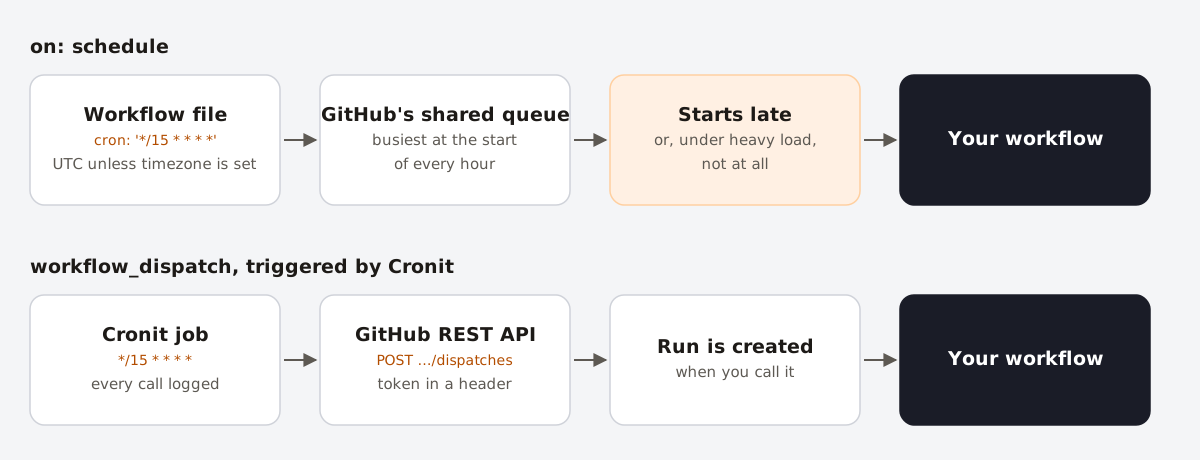
on: schedule, runs wait in GitHub's shared queue. With workflow_dispatch, the run is created when your scheduler calls the API.Step 1: add the trigger
Add workflow_dispatch to the workflow, with inputs if you want to pass parameters. Once the external trigger works, remove the schedule entry: otherwise the job runs twice, and in a public repository the 60-day inactivity rule can still disable the workflow.
on:
  workflow_dispatch:
    inputs:
      reason:
        description: 'Why this run was started'
        required: false
        default: 'manual'
Step 2: create a token with the smallest possible scope
Create a fine-grained personal access token that only has access to this repository, with the repository permission Actions: Read and write. Give it an expiry date and put a reminder in your calendar to rotate it.
Step 3: test the call with curl
curl -X POST \
  -H "Accept: application/vnd.github+json" \
  -H "Authorization: Bearer $GITHUB_TOKEN" \
  -H "X-GitHub-Api-Version: 2026-03-10" \
  https://api.github.com/repos/OWNER/REPO/actions/workflows/nightly.yml/dispatches \
  -d '{"ref":"main","inputs":{"reason":"cronit"}}'
Replace OWNER, REPO and the workflow file name. ref is the branch or tag to run on. With API version 2026-03-10, a successful call returns 200 with the new run's workflow_run_id and URLs. With the older 2022-11-28 version, it returns 204 with an empty body unless you add "return_run_details": true.
Step 4: schedule the call in Cronit
- In Cronit, create a new recurring job and give it a name such as "Nightly report (GitHub)".
- Set the method to POST and the URL to the
…/dispatchesaddress from step 3. - In Headers, add
Accept: application/vnd.github+json,Authorization: Bearer YOUR_TOKENandX-GitHub-Api-Version: 2026-03-10. - In Payload, enter
{"ref":"main","inputs":{"reason":"cronit"}}. - Under triggering, choose a cron expression, for example
17 3 * * *.
Every call then appears in the job's execution logs with its date and status, so a failed dispatch (an expired token, for example) is visible immediately rather than discovered weeks later.
Organization tip: GitHub's workflow execution protections (in public preview since June 2026) let admins restrict which actors can trigger workflows. If your organization uses them, make sure the account that owns the token is allowed to run workflow_dispatch.
Which trigger should you use?
on: schedule | workflow_dispatch + Cronit | |
|---|---|---|
| Start time | Best effort; can be late or dropped under load | When the API is called |
| Shortest interval | 5 minutes | Set by your scheduler |
| Time zone | UTC, or one IANA zone per entry | Set by your scheduler |
| Public repo inactive 60 days | Workflow is disabled | Not affected when there is no schedule trigger |
| Setup | A few lines of YAML | YAML + token + scheduled HTTP call |
| Run history | Actions tab | Actions tab + scheduler logs |
For a cleanup job where a delay of 30 minutes does not matter, on: schedule on an odd minute is perfectly fine. For reports people wait for, deployments, data syncs and anything with a deadline, trigger it explicitly.
FAQ
- What is the minimum interval for GitHub Actions cron?
- Every 5 minutes. Shorter intervals are not supported for scheduled workflows.
- What time zone does GitHub Actions cron use?
- UTC by default. Since March 2026 you can add a
timezonekey with an IANA name, such asAmerica/New_York, to each schedule entry. - Why is my scheduled workflow not running at all?
- The usual causes are: the workflow file is not on the default branch, the workflow was disabled after 60 days without activity in a public repository, or the YAML is invalid. Check the Actions tab for the workflow's status.
- How do I run a scheduled workflow manually?
- Add
workflow_dispatch:to theonsection. You then get a "Run workflow" button in the Actions tab, and you can rungh workflow run nightly.yml --ref mainfrom the command line.