Cron, time zones and daylight saving time
Twice a year, in every time zone that observes daylight saving time, the clock does something cron was never really designed for. In spring one hour of local time never happens; in autumn one hour happens twice. A job scheduled inside that hour may run late, not at all, or twice, depending on which scheduler runs it.
This guide explains how cron decides what time it is, what each common scheduler does when the clocks change, and how to run jobs in a specific time zone without surprises.
Short answer
Cron uses the server's time zone. Keep servers and infrastructure jobs in UTC, where there is no daylight saving time. When a job must follow local time, for example "9:00 in Paris", don't schedule it between 01:00 and 03:00, use a scheduler with explicit time zone support (systemd timers, CRON_TZ with cronie, or a cloud scheduler), and make the job safe to run twice.
Which time does cron use?
Classic cron has no time zone setting of its own. It compares the five time fields with the system's local time, which comes from the server's time zone. Check it with:
timedatectl
#               Local time: Tue 2026-10-27 09:15:02 CET
#                Time zone: Europe/Paris (CET, +0100)
Most cloud images use UTC by default, which is why a job written as 0 9 * * * on a laptop in Paris runs at 10:00 or 11:00 local time once deployed. If you change the server's time zone with sudo timedatectl set-timezone Europe/Paris, restart the cron service so it picks up the change.
A common trap: setting TZ=Europe/Paris at the top of a crontab does not change when jobs run on Debian and Ubuntu. Their crontab(5) page says it "will affect only the commands executed in the crontab, not the execution of the crontab tasks themselves." It only changes the time zone your script sees.
What happens when the clocks change
Take a job scheduled for 02:30 every day on a server set to Europe/Paris. On the last Sunday of March the clock jumps from 02:00 straight to 03:00, so 02:30 never happens. On the last Sunday of October it goes from 03:00 back to 02:00, so 02:30 happens twice.
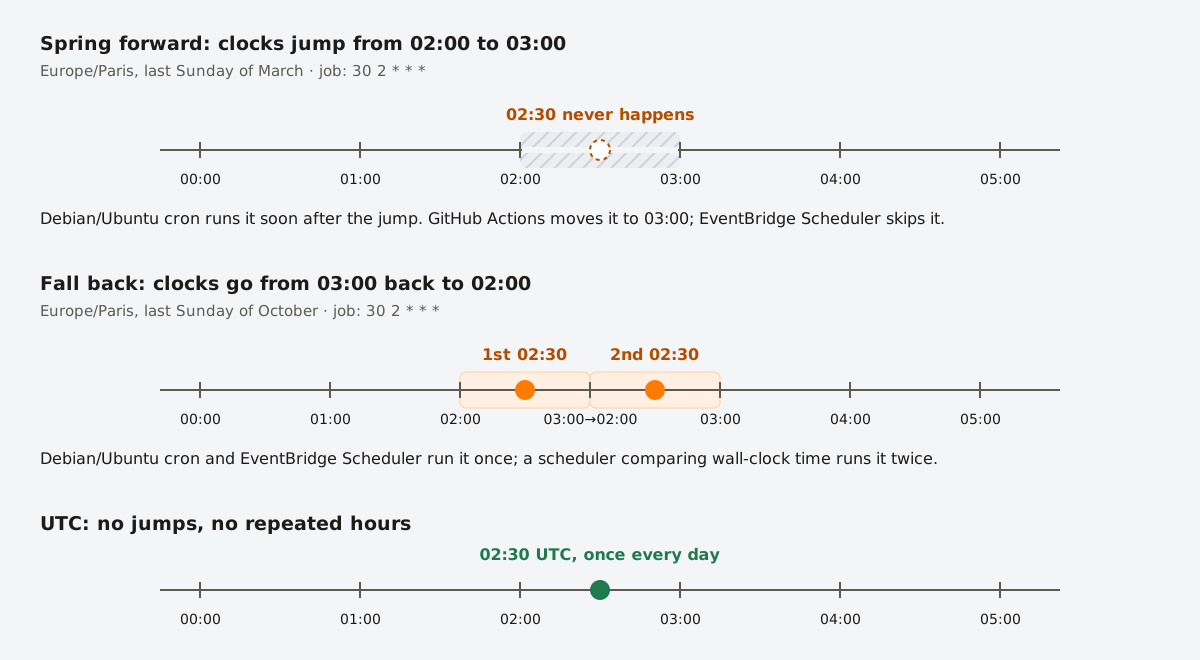
30 2 * * * job on the two daylight saving days in Paris, and in UTC.What happens next depends on the scheduler.
Debian and Ubuntu cron
Debian's cron, which Ubuntu also uses, has explicit rules for clock changes of less than 3 hours. From cron(8):
"If the time has moved forwards, those jobs which would have run in the time that was skipped will be run soon after the change. Conversely, if the time has moved backwards by less than 3 hours, those jobs that fall into the repeated time will not be re-run."
This only applies to jobs that run at a fixed time. Jobs with a * in the minute or hour field, or written as @hourly, simply follow the new time. Clock changes of more than 3 hours are treated as corrections and take effect immediately.
cronie (RHEL, Fedora, Rocky, Arch)
cronie's cron(8) page describes the same idea: jobs in a skipped interval "will be run immediately", and when time goes backward "running the same job twice is avoided". However, its crontab(5) page states the opposite, that jobs in the missing times are not run and jobs in repeated times run twice. Given the contradiction, test on your distribution, or keep jobs out of the transition window.
Cloud and CI schedulers
| Scheduler | Time zone support | Skipped hour | Repeated hour |
|---|---|---|---|
| GitHub Actions | Optional timezone per schedule | Moved to the next valid time (02:30 → 03:00) | Not documented |
| AWS EventBridge Scheduler | Per schedule | Run is skipped | Runs once |
| Google Cloud Scheduler | Per job | Follows wall-clock time; Google warns of "execution anomalies" and recommends UTC | |
| Vercel, Netlify, Cloudflare Workers, Render | UTC only | Not affected, but the local time of the run shifts by an hour | |
How to run a job in a specific time zone
cronie: CRON_TZ
cronie supports a CRON_TZ variable that sets the time zone for the entries below it:
CRON_TZ=Europe/Paris
0 9 * * 1-5  /srv/app/bin/send-digest.sh

CRON_TZ=America/New_York
0 9 * * 1-5  /srv/app/bin/send-digest-us.sh
Debian and Ubuntu cron do not support CRON_TZ: "cron will only handle tasks in a single timezone." Use one of the options below instead.
systemd timers
Since systemd 235, OnCalendar= accepts an IANA time zone. You need two small files, a service that runs the job and a timer that schedules it:
# /etc/systemd/system/digest.service
[Unit]
Description=Send the daily digest

[Service]
Type=oneshot
User=deploy
ExecStart=/srv/app/bin/send-digest.sh
# /etc/systemd/system/digest.timer
[Unit]
Description=Daily digest at 09:00 Paris time
[Timer]
OnCalendar=Mon..Fri *-*-* 09:00:00 Europe/Paris
Persistent=true
[Install]
WantedBy=timers.targetsudo systemctl daemon-reload
sudo systemctl enable --now digest.timer
systemctl list-timers digest.timerPersistent=true also fixes another cron weakness: if the machine was off at 09:00, the job runs as soon as the timer is active again.
Plain cron on a UTC server: the guard pattern
If you cannot change the scheduler, run the job at both UTC times that can correspond to the local time, and let a guard decide. 09:00 in Paris is 07:00 UTC in summer and 08:00 UTC in winter:
# runs at 07:00 and 08:00 UTC; only the one that is 09:00 in Paris goes through
0 7,8 * * 1-5  [ "$(TZ=Europe/Paris date +\%H)" = "09" ] && /srv/app/bin/send-digest.sh
Note the \%: an unescaped % breaks crontab commands (see the troubleshooting checklist). The same trick works with any UTC-only scheduler, including HTTP schedulers such as Cronit: call your endpoint at both UTC hours and let the endpoint check the local time before doing any work.
Other platforms
- GitHub Actions: add
timezone: 'Europe/Paris'next tocron:. See GitHub Actions cron. - Kubernetes: set
spec.timeZoneon the CronJob, for exampletimeZone: "Europe/Paris". - Laravel: add
->timezone('Europe/Paris')to a scheduled task. - Upstash QStash: prefix the expression, for example
CRON_TZ=America/New_York 0 4 * * *.
Rules of thumb
- Use UTC for system jobs. Backups, cleanups, syncs and reports for machines have no reason to follow a local clock.
- Use local time only for people. "Send the digest at 9:00" is a human promise and should follow the user's time zone.
- Stay out of the transition window. In the EU the clocks change at 01:00 UTC; in the US at 02:00 local time. A local-time job at 04:00 is not affected in either region.
- Make jobs idempotent. Record a key such as "digest 2026-10-27" before doing the work and skip it if it already exists. A repeated hour then cannot send the digest twice.
- Log in UTC. A log that says 02:30 twice is much harder to read than one that says 00:30Z and 01:30Z.
Users in many time zones
To send something at 09:00 in each user's own time zone, do not create one cron entry per zone. Run a single job every hour and select the users for whom it is currently 9 o'clock (users in half-hour zones such as India get it at 09:30):
-- PostgreSQL: users whose local time is between 09:00 and 09:59 right now
SELECT id, email
FROM users
WHERE extract(hour FROM now() AT TIME ZONE timezone) = 9
  AND (last_digest_on IS NULL
       OR last_digest_on < (now() AT TIME ZONE timezone)::date);
The last_digest_on check makes the job idempotent, so the repeated hour in autumn does not send a second digest. Run it at every hour with 0 * * * *.
FAQ
- What time zone does cron use?
- The system time zone of the machine it runs on, shown by
timedatectl. Cloud images usually default to UTC. - Can I set a time zone for a single crontab line?
- With cronie, yes: put
CRON_TZ=Zone/Nameabove the line. Debian and Ubuntu cron do not support it; use a systemd timer with a time zone inOnCalendar, or the guard pattern above. - Does cron handle daylight saving time?
- Debian and Ubuntu cron run fixed-time jobs from a skipped hour soon after the change and do not repeat jobs in a repeated hour. Other schedulers behave differently, so the safest option is to avoid scheduling local-time jobs between 01:00 and 03:00.
- Why did my job run twice in October?
- The clocks went back and the scheduler matched the same local time twice. Move the job out of the repeated hour, schedule it in UTC, or make it idempotent.