How to monitor cron jobs and get alerted when they fail
Cron is very good at starting commands and very bad at telling you what happened next. A backup can fail every night for a month, and the first sign is the day you need to restore it. Monitoring a scheduled job means answering four questions after every run: did it start, did it succeed, how long did it take, and did it produce the right result?
This guide builds that up step by step, from a log file to alerts that fire even when a job never starts at all. The shell examples work with any cron on Linux; the same ideas apply to cloud schedulers and HTTP jobs.
Short answer
Log every run with its exit code and duration, alert when the exit code is not 0, and add a heartbeat: the job pings a monitoring service when it finishes, and the service alerts you when the ping does not arrive on time. The heartbeat is the part people skip, and it is the only one that catches a job that never ran.
Loud failures and silent failures
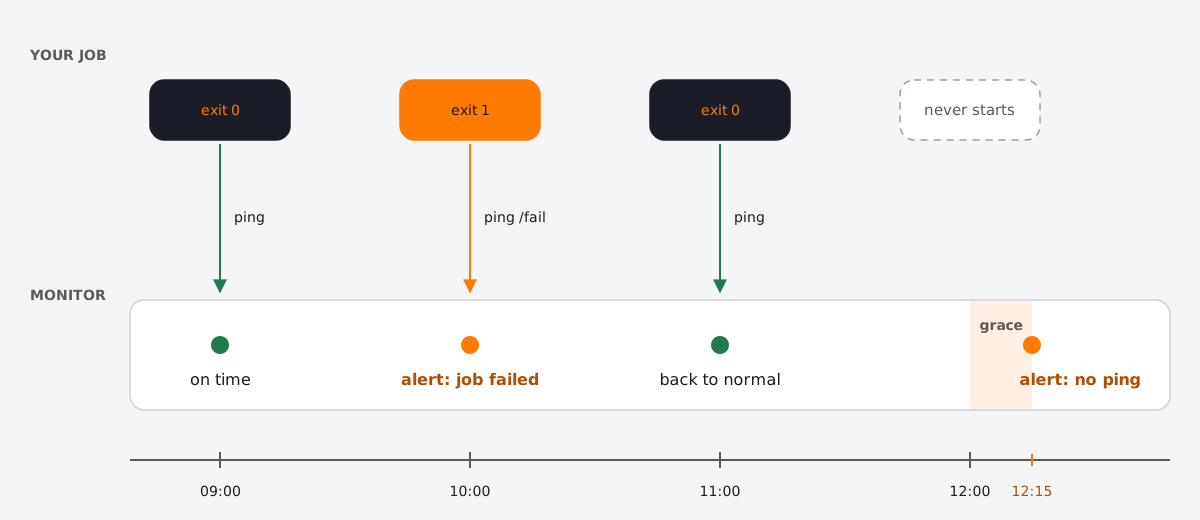
A job can fail in two very different ways:
- Loud failures: the job runs and exits with an error. The disk is full, the API returns 500, the database password changed. The job knows it failed and can report it.
- Silent failures: the job never runs. The server was replaced and the crontab was not part of the image, the cron daemon stopped, someone commented the line out, a CI schedule was disabled. Nothing runs, so nothing reports anything.
Error alerts only catch the first kind. To catch the second, something outside the job has to expect it and notice when it is missing.
Step 1: log every run
Start with a record of what happened. Instead of adding redirections to every crontab line, use a small wrapper that logs the start time, the output, the exit code and the duration of any command:
#!/usr/bin/env bash
# /usr/local/bin/cronwrap NAME COMMAND [ARGS...]
set -u
name="$1"; shift
log="/var/log/cron-jobs/${name}.log"
mkdir -p "$(dirname "$log")"

start=$(date +%s)
echo "=== $(date -Is) start" >> "$log"
"$@" >> "$log" 2>&1
status=$?
echo "=== $(date -Is) end status=${status} duration=$(( $(date +%s) - start ))s" >> "$log"
exit "$status"
Make it executable with chmod +x /usr/local/bin/cronwrap, then use it in the crontab:
15 2 * * * /usr/local/bin/cronwrap nightly-backup /srv/app/bin/backup.shDoing the date formatting inside the script also avoids cron's % trap (see the troubleshooting checklist). Add the log directory to logrotate so the files do not grow forever.
Step 2: prevent overlapping runs
A job every 5 minutes that occasionally takes 7 will start on top of itself, and two copies of an import or a billing run can do real damage. flock from util-linux holds a lock for the duration of the command, and -n skips the run if the lock is already taken:
*/5 * * * * /usr/local/bin/cronwrap sync flock -n /tmp/sync.lock /srv/app/bin/sync.shWhen flock -n skips a run it exits with status 1. Because flock runs inside the wrapper, a skipped run is logged like any other failure and reaches the alerting in the next step.
Step 3: alert when a run fails
Cron can email the output of a job through MAILTO, but only if the server has a working mail transfer agent, and it emails on any output, not only on failures. A more reliable option is to post to your team chat when the exit code is not 0. Add this before the final exit in the wrapper:
if [ "$status" -ne 0 ] && [ -n "${ALERT_WEBHOOK_URL:-}" ]; then
  curl -fsS -m 10 -o /dev/null -X POST -H 'Content-Type: application/json' \
    --data "{\"text\":\"Cron job ${name} failed with status ${status} on $(hostname)\"}" \
    "$ALERT_WEBHOOK_URL"
fi
Set ALERT_WEBHOOK_URL at the top of the crontab to a Slack incoming webhook, or any service that accepts a JSON text field. The -m 10 timeout makes sure a slow alerting service never blocks the job.
Step 4: add a heartbeat for jobs that never run
A heartbeat monitor, sometimes called a dead man's switch, turns the problem around. You tell the monitor how often the job should report in, for example every hour, plus a grace period. The job sends an HTTP request when it finishes. If no request arrives within the period plus grace, the monitor alerts you, whatever the reason.
Most heartbeat services follow the same pattern: a unique URL per job, with optional variants to signal the start of a run and a failure. With Healthchecks.io, for example:
#!/usr/bin/env bash
URL=https://hc-ping.com/YOUR-CHECK-UUID

curl -fsS -m 10 --retry 3 -o /dev/null "$URL/start"   # optional: measures duration
/srv/app/bin/backup.sh
status=$?
curl -fsS -m 10 --retry 3 -o /dev/null "$URL/$status" # 0 = success, anything else = failure
exit "$status"
Sending the exit code covers both kinds of failure with one check: a non-zero code triggers an alert right away, and a missing ping triggers one when the grace period ends. At the time of writing, Healthchecks.io monitors up to 20 jobs for free and Cronitor up to 5; both send alerts by email and to chat tools.
Choosing the timing:
- Period: the job's interval. An hourly job gets 1 hour, a nightly job 1 day.
- Grace: the longest normal run time plus a margin. If the backup usually takes 8 minutes and sometimes 20, a grace period of 30 minutes avoids false alarms.
- Send the ping last. A ping at the start of the script only proves that the script started.
Step 5: check the result, not just the exit code
An exit code of 0 means the script did not crash. It does not mean it did its job. A backup script can happily write an empty file, and an import can succeed with zero rows because the source API changed. Add one or two assertions that fail the run when the result is obviously wrong:
# fail if the backup is missing or suspiciously small (under 1 MB)
file="/backups/db-$(date +%F).sql.gz"
test -s "$file" || { echo "backup file missing"; exit 1; }
[ "$(stat -c %s "$file")" -gt 1048576 ] || { echo "backup too small"; exit 1; }
For data pipelines, a freshness check is often the best single test: query the newest timestamp in the destination table and fail if it is older than expected.
What to monitor, at a glance
| Question | Signal | Catches |
|---|---|---|
| Did it start? | Heartbeat arrives on time | Dead daemon, deleted crontab, server down, disabled schedule |
| Did it succeed? | Exit code, fail ping | Errors, crashes, timeouts, skipped runs |
| How long did it take? | Duration in the log, start ping | Slow queries, growing data, runs that will soon overlap |
| Is the result right? | Assertions, freshness checks | Empty files, zero rows, stale data |
Monitoring HTTP jobs
When a job is an HTTP endpoint called on a schedule, as with Cronit, the scheduler records each call. In Cronit, every run appears in the job's execution logs with its date, status and log, so a failing endpoint is visible without any extra setup. To make that log useful:
- Return a real error status when the work fails. An endpoint that catches every exception and answers
200looks healthy forever. - Return a short summary, such as
{"processed": 120, "skipped": 3}, so the log shows what each run did. - Keep the heartbeat for work that continues after the response, for example a background function or a queued job. The scheduler only sees that the work was accepted; a heartbeat sent when the work actually finishes tells you it completed.
FAQ
- How do I know if a cron job ran?
- Check the system log for a line from cron (
grep CRON /var/log/syslogon Debian and Ubuntu,/var/log/cronon RHEL), and log the job's own output and exit code to a file. To know it ran without checking, use a heartbeat monitor. - How do I get an email when a cron job fails?
- Set
MAILTOin the crontab and install a mail transfer agent, or have the job call a webhook or a heartbeat service with its exit code. The webhook approach works on servers without any mail setup. - What is a dead man's switch for cron?
- A monitor that expects a signal from your job on a regular schedule and raises an alert when the signal does not arrive. It detects jobs that never started, which no amount of error handling inside the job can do.