
How to run the Laravel scheduler on shared hosting
Laravel's task scheduler lets you define all your recurring jobs in PHP instead of in a crontab. But something still has to start it: Laravel expects php artisan schedule:run to be called every minute. On a VPS that is one crontab line. On shared hosting it can be harder: there may be no SSH access, cron may only run every 15 minutes, or it may not be available at all.
This guide covers the standard setup, how to do it from cPanel, and how to run the scheduler from a secured HTTP route when your host does not give you a usable cron. Examples use Laravel 13, the current version; they work the same way in Laravel 11 and 12.
Short answer
Define tasks in routes/console.php, then run php artisan schedule:run every minute with your host's cron tool. If that is not possible, add a token-protected route that calls Artisan::call('schedule:run') and have an online cron service request it on the schedule your tasks need.
Define your scheduled tasks
Since Laravel 11, schedules live in routes/console.php:
<?php

use Illuminate\Support\Facades\Schedule;

Schedule::command('emails:digest')->dailyAt('08:00');
Schedule::command('reports:build')->hourly()->withoutOverlapping();
Schedule::command('backups:run')->weekly();
Check what Laravel thinks is scheduled, and when each task runs next:
php artisan schedule:listTimes are interpreted in your application's time zone (config/app.php) unless you add ->timezone('Europe/Paris') to a task. If you do, read our guide to daylight saving time before scheduling anything between 02:00 and 03:00.
The standard setup: one cron entry
On any server where you control the crontab, add this single line with crontab -e:
* * * * * cd /path-to-your-project && php artisan schedule:run >> /dev/null 2>&1Every minute, schedule:run checks every task and starts the ones that are due. Nothing else needs to change when you add or edit tasks.
On cPanel
- Open Cron Jobs in cPanel.
- Under common settings, choose Once Per Minute (* * * * *).
- In the command field, enter the full path to PHP and to your project, for example:
cd /home/USERNAME/laravel && /usr/local/bin/php artisan schedule:run >> /dev/null 2>&1 - Save, wait two minutes, and check your logs.
The PHP path is the part that usually goes wrong. Hosts often have several PHP versions, and the default php in cron may be older than the one your site uses. Laravel 13 needs PHP 8.3 or later; ask your host for the CLI path of the right version if schedule:run fails with a syntax error. Our cron troubleshooting checklist covers the other common causes.
When the host only allows every 15 minutes
Some hosts limit how often cron jobs can run. With a 15-minute cron, schedule:run only checks the schedule at minutes 0, 15, 30 and 45, so a task set for dailyAt('08:05') is never due when the scheduler looks. Either align every task with the times the scheduler actually runs, or use the HTTP approach below.
No cron at all? Run the scheduler over HTTP
If your host does not offer cron jobs, you can start the scheduler from a web request instead. An external service calls a secret URL, and that route runs schedule:run. Laravel then does exactly what it would do from a crontab.
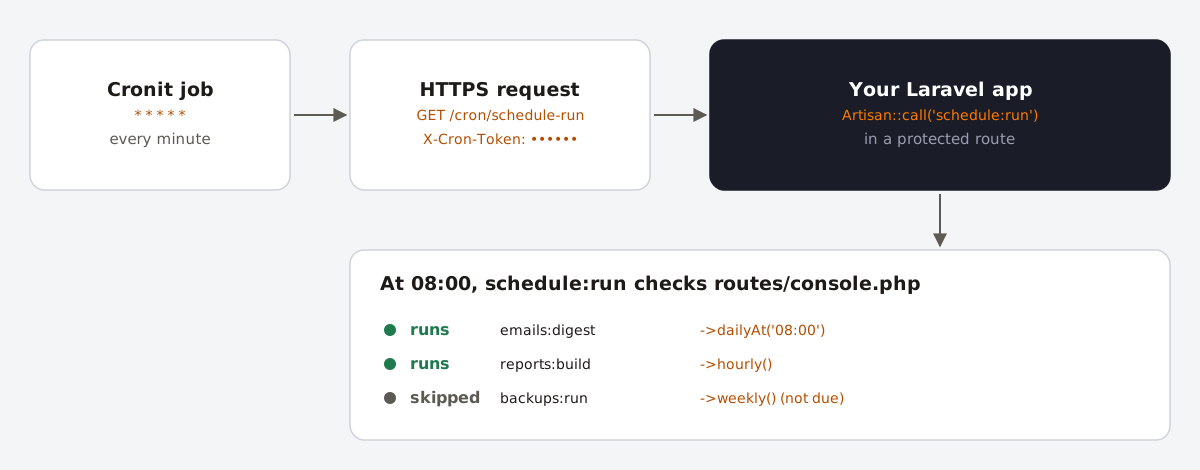
schedule:run still decides which tasks are due.Step 1: add a secret token
Generate a random token and add it to .env:
php -r "echo bin2hex(random_bytes(32)), PHP_EOL;"

# .env
CRON_TOKEN=paste-the-value-here
Expose it through config/services.php, so it still works when the configuration is cached:
'cron' => [
    'token' => env('CRON_TOKEN'),
],
Step 2: add the route
// routes/web.php
use Illuminate\Http\Request;
use Illuminate\Support\Facades\Artisan;
use Illuminate\Support\Facades\Route;

Route::get('/cron/schedule-run', function (Request $request) {
    $token = (string) config('services.cron.token');

    abort_if(
        $token === '' || ! hash_equals($token, (string) $request->header('X-Cron-Token')),
        403
    );

    Artisan::call('schedule:run');

    return response(Artisan::output())
        ->header('Content-Type', 'text/plain')
        ->header('Cache-Control', 'no-store');
})->middleware('throttle:10,1');
A few details are deliberate. The empty-token check stops the route from accepting requests when CRON_TOKEN is missing. hash_equals compares the token in constant time. The token travels in a header rather than in the URL, so it does not end up in access logs. Cache-Control: no-store keeps a server-side page cache from answering instead of Laravel, and the throttle limits abuse if the URL leaks.
Test it:
curl -i -H "X-Cron-Token: YOUR_TOKEN" https://example.com/cron/schedule-runYou should get a 200 with the scheduler's output: the commands it started, or "No scheduled commands are ready to run." Without the header, you should get a 403.
Step 3: schedule the call in Cronit
- Create a new recurring job in Cronit.
- Method GET, URL
https://example.com/cron/schedule-run. - In Headers, add
X-Cron-Token: YOUR_TOKEN. - Choose the schedule (see the next section).
The response body is the scheduler's output, so the job's execution logs show which tasks ran at each call.
Match the trigger to your tasks
Laravel's design assumes a call every minute, but you only need to call the scheduler at the minutes when something is due. If all your tasks are hourly, daily or weekly at minute 0, calling the route at 0 * * * * is enough, and that is about 720 calls a month instead of about 43,200 for every minute.
| Your tasks use | Trigger schedule | Calls per month |
|---|---|---|
everyMinute(), or odd times like dailyAt('08:07') | * * * * * | about 43,200 |
everyFiveMinutes() and coarser | */5 * * * * | about 8,640 |
everyFifteenMinutes() and coarser | */15 * * * * | about 2,880 |
hourly(), daily(), dailyAt('08:00'), weekly() | 0 * * * * | about 720 |
Compare the number with your plan's monthly allowance on the pricing section. If you add a task later at a time that is not covered, it will not run, so run php artisan schedule:list after every change.
Keep each run short
When the scheduler runs inside a web request, it is subject to PHP's max_execution_time and your web server's timeout, which on shared hosting are often 30 to 60 seconds. Tasks due at the same time run one after another, so their durations add up.
- Queue the heavy work. Schedule a job instead of a command, for example
Schedule::job(new BuildMonthlyReport)->monthly();, so the scheduler only dispatches it. - Process the queue with a second call. Without a long-running worker, add a second protected route that runs
Artisan::call('queue:work', ['--stop-when-empty' => true, '--max-time' => 50]);and call it every few minutes. - Avoid sub-minute tasks. If any task uses
everyThirtySeconds()or similar,schedule:runkeeps running until the end of the minute, which holds the HTTP request open for up to 60 seconds. - Use
withoutOverlapping()on anything that could still be running when it is next due. It stores a lock in your cache, which works with the file cache driver on a single server.
FAQ
- Can the Laravel scheduler run without cron?
- Yes.
php artisan schedule:workruns the scheduler in the foreground every minute, which is handy locally but needs a long-running process. On shared hosting, callschedule:runfrom a protected route on a schedule instead. - Why do my scheduled tasks never run on shared hosting?
- The most common causes are a cron job that uses the wrong PHP version, a wrong project path, a cron that only runs every 15 minutes while your tasks run at other minutes, and a time zone mismatch between the server and
config/app.php. - How can I test a single scheduled task?
- Run
php artisan schedule:testand choose the task, or run the command directly, for examplephp artisan emails:digest. - Is calling schedule:run over HTTP safe?
- Yes, if the route rejects requests without the secret, as in the example above. Without that check, anyone could start your tasks at will.