
How to run cron jobs on Render
Render has a dedicated service type for scheduled work: the cron job. You point it at your repository or a Docker image, give it a command and a schedule, and Render starts a fresh instance, runs the command and shuts it down again. It is clean and isolated, but it is a separate paid service, and it builds and starts a new container for every run.
This guide covers both ways to run scheduled work on Render: a cron job service, and an HTTP call to a web service you already have. It includes costs, limits and the mistakes that cause runs to hang or overlap.
Short answer
Create a Cron Job service in the dashboard or in render.yaml with type: cron, a schedule in UTC and a startCommand that exits when it is done. It is billed by the second with a $1 monthly minimum, and there is no free tier. If you already run a web service, you can instead expose a protected route and call it on a schedule from an HTTP scheduler.
Create a cron job in the dashboard
- In the Render dashboard, choose New → Cron Job.
- Connect the repository (or pick a prebuilt Docker image) and the branch to deploy.
- Set the build command, for example
npm ciorpip install -r requirements.txt. - Set the schedule as a cron expression, in UTC.
0 3 * * *runs every day at 03:00 UTC. - Set the command to run, for example
node scripts/cleanup.js. - Add the environment variables the job needs, such as
DATABASE_URL, then create the service.
The service page shows each run with its logs, and a button to trigger a run manually, which is the fastest way to test the command.
Or define it in render.yaml
If you manage infrastructure as code with a Blueprint, add a service of type cron:
services:
  - type: cron
    name: nightly-cleanup
    runtime: node
    schedule: "0 3 * * *"          # 03:00 UTC every day
    buildCommand: npm ci
    startCommand: node scripts/cleanup.js
    envVars:
      - key: DATABASE_URL
        fromDatabase:
          name: app-db
          property: connectionString
schedule is required for cron services. If you are unsure about an expression, check it in the cron analyzer.
Make sure the command exits
Render's documentation puts it plainly: "Make sure to use a command that exits when it's done!" A cron job runs until its process ends, so a script that leaves a database pool, a Redis client or a timer open keeps the instance running, and billing, until Render stops it after 12 hours.
// scripts/cleanup.js
import { pool } from '../db.js';

try {
  const { rowCount } = await pool.query(
    "DELETE FROM sessions WHERE expires_at < now() - interval '7 days'"
  );
  console.log(`Deleted ${rowCount} expired sessions`);
} catch (err) {
  console.error(err);
  process.exitCode = 1;   // mark the run as failed
} finally {
  await pool.end();       // close connections so the process can exit
}
Exit with a non-zero code on failure so the run shows up as failed in the dashboard.
Time zones, overlaps and other rules
- UTC only. All day and time fields use UTC, so a 09:00 local job moves by an hour when daylight saving time changes. See cron and daylight saving time.
- One run at a time. At most one run of a cron job is active. If a run is still going when the next one is due, Render delays the next run until the active one finishes.
- Manual runs cancel the active run. Triggering a run by hand while one is active cancels it.
- 12-hour maximum. Render stops a run after 12 hours.
- No persistent disk. Write results to a database or object storage, not to the local file system.
What a Render cron job costs
Cron jobs are billed by the second for the time they are actually running, with a minimum charge of $1 per cron job service per month. There is no free instance type for cron jobs. At the time of writing, the smallest instance (0.5 CPU, 512 MB) costs $0.00016 per minute.
For example, a job that runs for 2 minutes every hour uses about 1,440 minutes a month. At $0.00016 per minute that is about $0.23, so you pay the $1 minimum. Most small jobs cost exactly that, which is cheap, but it adds up if you split work into many separate cron services. Check Render's pricing page for current rates.
Alternative: call your web service on a schedule
If the code already lives in a web service, you do not have to build and start a separate container for each run. Add a protected route that runs the job, and have a scheduler call it over HTTPS.
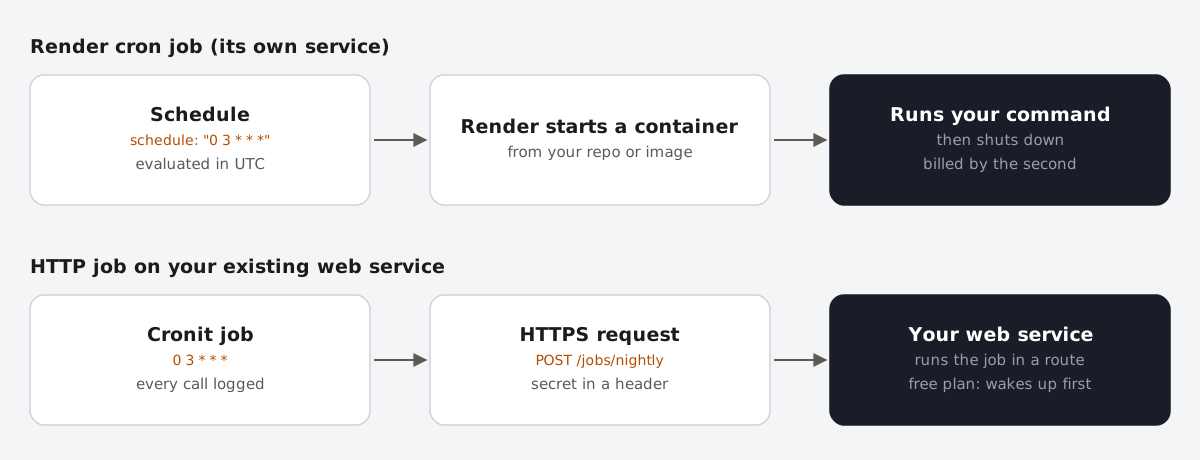
An Express example:
app.post('/jobs/nightly', async (req, res) => {
  if (req.get('authorization') !== `Bearer ${process.env.CRON_SECRET}`) {
    return res.sendStatus(401);
  }

  try {
    const deleted = await cleanupExpiredSessions();
    res.json({ ok: true, deleted });
  } catch (err) {
    console.error('nightly cleanup failed', err);
    res.status(500).json({ ok: false });
  }
});
Then create the job in Cronit: method POST, the route's URL, an Authorization: Bearer … header with your secret, and the schedule, for example 0 3 * * *. Because the route returns 500 on failure, a failed run is visible in the job's execution logs.
Keep the work short enough to finish within a normal request. For long jobs, have the route put a task on a queue, answer 202, and let a background worker do the work.
A note on free web services
Free web services spin down after 15 minutes without inbound traffic and take about a minute to start again. A once-a-day HTTP job works fine on a free service, as long as your scheduler waits long enough for the cold start. We don't recommend pinging a free service every few minutes just to keep it awake: it uses up the 750 free instance hours your workspace gets each month, and anything that must stay up belongs on a paid instance anyway.
Which option should you choose?
| Render cron job | HTTP job on a web service | |
|---|---|---|
| Cost | Per second, $1/month minimum per job | Included in the web service |
| Isolation | Own container, own resources | Shares CPU and memory with your app |
| Max duration | 12 hours | A normal request; use a queue for more |
| Overlapping runs | Delayed by Render | Your code has to prevent them |
| Time zone | UTC | Set by your scheduler |
| Changing the schedule | Edit the service or Blueprint | Edit the job, no deploy |
Use a cron job service for heavy or long work that should not slow down your app, such as backups, large imports and report generation. Use an HTTP job for light, frequent tasks that reuse your app's code and connections.
FAQ
- Does Render have free cron jobs?
- No. Cron jobs are a paid service type, billed by the second with a $1 monthly minimum per cron job.
- What time zone do Render cron jobs use?
- UTC. There is no setting to change it.
- Why does my Render cron job never finish?
- Something keeps the process alive, usually an open database connection or client. Close it in a
finallyblock, or callprocess.exit()once the work is done. - What happens if a run takes longer than the interval?
- Render never runs two instances of the same cron job at once. The next run waits until the current one finishes.