The best online cron job services compared
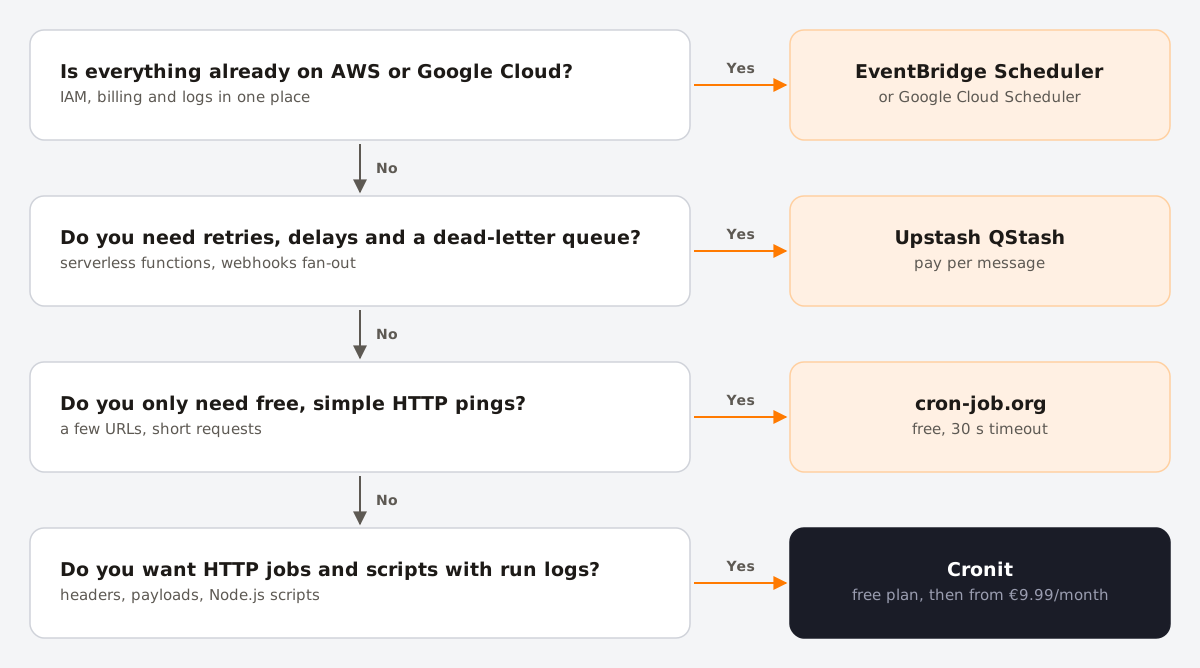
An online cron job service calls a URL, or runs a script, on a schedule you define, without a server of your own. It is the simplest way to trigger a webhook every few minutes, run the scheduler of an app hosted on a platform without cron, or keep scheduled work in one place across several clouds.
There are many of them, and the differences that matter (shortest interval, request timeout, retries, alerts, pricing model) are often buried in pricing pages. This comparison puts them side by side.
Disclosure: Cronit is our product. We have kept this comparison to facts published by each provider, and each section links to the provider's site. Prices and limits were checked on October 27, 2026 and change often, so confirm on the provider's site before you decide.
The services at a glance
| Service | Free tier | Paid from | Shortest interval | Request timeout |
|---|---|---|---|---|
| Cronit | 500 jobs/month | €9.99/month (20,000 jobs) | 1 minute | — |
| cron-job.org | Free, no job limit (fair use) | Optional sustaining membership | 1 minute | 30 s |
| EasyCron | 200 executions on the busiest day, renewed monthly | $24/year | 20 min free, 1 min paid | 5 s free, up to 12 h paid |
| FastCron | 15 jobs, log in every 90 days | $6/month | 5 min free, 30 s paid | 15 s free, 1 h paid |
| Upstash QStash | 1,000 messages/day, 10 schedules | $1 per 100,000 messages | 1 minute | 15 min free, 2 h paid |
| Google Cloud Scheduler | 3 jobs per billing account | $0.10 per job per month | 1 minute | 15 s to 30 min (default 3 min) |
| AWS EventBridge Scheduler | 14 million invocations/month | $1 per million invocations | 1 minute | n/a (invokes AWS services) |
A dash means the provider does not publish the value.
Cronit
Cronit is an online cron job platform run by ACL Software, a company based in Belgium. You create jobs in the browser, either as HTTP calls or as JavaScript (Node.js) scripts.
- HTTP jobs: any method (GET, POST, PUT, PATCH, DELETE), custom headers and a request payload, so it works with authenticated APIs and webhooks.
- Script jobs: JavaScript functions with helpers to make HTTP calls, connect to a database and keep values in a cache between runs. See scheduling JavaScript functions.
- Scheduling: a cron expression, a simple interval such as "every 10 minutes", or a single run at a given time, with a preview of the next run times.
- Execution logs: every run is recorded with its date, status and log.
- Pricing: Free (500 jobs/month), Basic €9.99/month (20,000 jobs), Premium €29.99/month (100,000 jobs), Enterprise on quote. Paid plans include 24/7 email support.
Good for: teams that want HTTP jobs and small scripts in one place, with run history, without managing infrastructure. Watch out for: plans are sized by jobs per month, so check the numbers for frequent schedules (see the run math below).
cron-job.org
cron-job.org is a long-running free service funded by voluntary memberships.
- No limit on the number of jobs, under a fair-use rule; schedules down to every minute.
- Configurable method, headers and body.
- A 30-second request timeout; members get a higher one.
- Notifications on failure and on recovery by email, webhook, Slack, Telegram or Discord.
- History of the last 50 executions; response headers and bodies are kept for 2 days.
- A job is disabled after it fails more than 25 times in a row. The REST API allows 100 requests a day on the free tier.
Good for: free, simple HTTP pings to endpoints that answer quickly. Watch out for: the 30-second timeout and the short history.
EasyCron
EasyCron prices its plans by EPD, the number of executions on your busiest day, rather than by the number of jobs.
- Free: 200 EPD, a 20-minute minimum interval, a 5-second timeout and 10 log entries. The free plan expires monthly and is renewed by logging in.
- Paid from $24 a year: 8,000 EPD, 1-minute interval, timeouts up to 12 hours.
- Notifications by email, Slack and webhook on all plans; HTTP requests can be customized.
Good for: long-running endpoints, thanks to the long timeouts on paid plans. Watch out for: the free tier is too limited for most production use.
FastCron
FastCron offers short intervals on its paid plans.
- Free: 15 jobs, a 5-minute interval, a 15-second timeout and 50 log entries; you must log in every 90 days to keep it.
- Starter from $6 a month: intervals down to 30 seconds and a 1-hour timeout. Higher plans add more jobs and intervals down to 15 seconds.
- Custom HTTP method, authentication, post data and headers; notifications by email, Slack, Discord, Telegram and webhook.
Good for: schedules more frequent than once a minute. Watch out for: the 90-day login rule on the free plan.
Upstash QStash
Upstash QStash is a message queue for serverless apps with built-in schedules, controlled by API or SDK rather than a dashboard-first workflow.
- Failed deliveries are retried 3 times by default with exponential backoff; a failure callback and a dead-letter queue catch messages that still fail.
- Schedules use cron syntax in UTC, or another zone with a
CRON_TZ=prefix. - Free: 1,000 messages a day and 10 active schedules. Pay as you go: $1 per 100,000 messages, and each retry counts as a message.
- Custom headers are forwarded with an
Upstash-Forward-prefix.
Good for: serverless backends that need guaranteed delivery and retries. Watch out for: it is a developer tool; there is no point-and-click job editor in the same sense as the others.
Google Cloud Scheduler
Cloud Scheduler is Google Cloud's managed cron service.
- 3 free jobs per billing account, then $0.10 per job per month, however often it runs. Paused jobs still count.
- HTTP targets with headers, and a body for POST and PUT. The deadline is configurable from 15 seconds to 30 minutes (default 3 minutes).
- No retries by default; up to 5 can be configured, with backoff from 5 seconds to 1 hour.
- Time zone per job. Logs go to Cloud Logging; there are no built-in failure alerts, so use Cloud Monitoring.
Good for: projects already on Google Cloud. Watch out for: it needs a project with billing enabled, and alerting is a separate setup.
AWS EventBridge Scheduler
EventBridge Scheduler is AWS's scheduler, with a very generous free tier.
- 14 million invocations a month free, then $1 per million.
- Targets are AWS services such as Lambda, SQS and Step Functions, not arbitrary URLs. To call an external endpoint, invoke a Lambda function that makes the request.
- Configurable retries (up to 185 attempts over up to 24 hours) and a dead-letter queue.
- Time zone per schedule. On daylight saving days, a non-existent time is skipped and a repeated time runs once.
Good for: workloads already on AWS. Watch out for: IAM roles and the extra Lambda hop for external HTTP calls.
The run math: how many executions do you need?
Pricing models differ: some count jobs, some count executions, some count your busiest day. Translate your schedules into runs before comparing:
| Schedule | Expression | Runs per day | Runs per 30-day month |
|---|---|---|---|
| Every minute | * * * * * | 1,440 | 43,200 |
| Every 10 minutes | */10 * * * * | 144 | 4,320 |
| Every 30 minutes | */30 * * * * | 48 | 1,440 |
| Every hour | 0 * * * * | 24 | 720 |
| Every day | 0 0 * * * | 1 | 30 |
Add up all your jobs, and include retries if the service bills them.
What to check before you choose
- Timeout vs. your endpoint. If your endpoint takes 40 seconds, a 30-second timeout records a failure every time. For long work, answer quickly and continue in the background.
- Authentication. You need custom headers to send a secret token. Never rely on an unguessable URL alone.
- Retries and idempotency. A retried request must not charge a customer twice. Make endpoints safe to call more than once.
- Alerts and history. How will you find out that a job has been failing? See how to monitor cron jobs.
- Time zones. UTC-only services shift local-time jobs by an hour twice a year. See cron and daylight saving time.
- Where your data goes. Headers often contain secrets. Check where the provider is based and how long it keeps request and response data.
Do you need a separate service at all?
Many platforms have a scheduler built in. It is often the right choice, until you hit its limits:
- Vercel: once a day on Hobby, every minute on Pro.
- Netlify: scheduled functions limited to 30 seconds.
- Cloudflare Workers: 5 Cron Triggers per account on Free.
- GitHub Actions: every 5 minutes at best, and runs can be delayed or dropped.
- Render: cron jobs are a separate paid service.
An external scheduler is worth it when you need more frequency or precision than the platform allows, one place to see jobs across several platforms, or schedules you can change without redeploying.
FAQ
- What is an online cron job service?
- A hosted service that sends an HTTP request, or runs a script, on a schedule you define with a cron expression. It replaces a crontab on a server you would otherwise have to maintain.
- Is there a free online cron job service?
- Yes. cron-job.org is free with no job limit under fair use. Cronit, EasyCron, FastCron, Upstash QStash, Google Cloud Scheduler and AWS EventBridge Scheduler all have free tiers with limits, listed in the table above.
- Can an online cron service run a job every minute?
- Most can. EasyCron and FastCron restrict short intervals to paid plans, and FastCron's paid plans go below one minute.
- How do I secure a URL called by a cron service?
- Use HTTPS, send a long random secret in a header such as
Authorization: Bearer …, reject requests without it, and make the endpoint safe to call twice.